

If you’ve ever handed your child a smartphone or managed social media accounts across multiple devices, chances are you’ve asked yourself this:
“Is there a way to read encrypted WhatsApp messages — legally and without overstepping boundaries?”
As someone who’s spent years in the social media and digital parenting space, I’ve heard this question more times than I can count. Parents want to protect their kids. Businesses want oversight over communication. And yes, sometimes people are simply curious. But here’s the truth — WhatsApp’s encryption isn’t something to “bypass” without consequences.
So, let’s get real and explore legitimate ways you can view encrypted WhatsApp messages — without breaking the law or compromising someone’s privacy.
🛡️ What Does “Encrypted” Mean on WhatsApp?
Since 2016, WhatsApp has used end-to-end encryption (E2EE) to protect chats. This means only the sender and the recipient can read a message — not Meta (WhatsApp’s parent company), your mobile provider, or any middleman.
Even as a tech blogger with advanced tools at my disposal, I can’t “crack” an encrypted message without access to the device itself or proper login credentials. And that’s a good thing — privacy matters.
But if you have access to a device (like your child’s phone or a company phone), there are legal ways to view chats. Let’s walk through them.
🔍 How to Read Encrypted WhatsApp Messages — Ethically
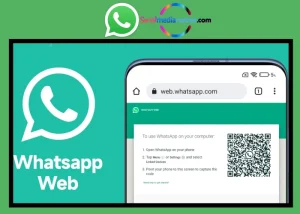
1. WhatsApp Web (With Permission)
This is the most practical and legal method if you have physical access to the person’s device — like your child’s or a company employee’s work phone.
Here’s how:
- Open a browser on your computer and visit web.whatsapp.com.
- On the target device, open WhatsApp → Tap the three dots (top-right) → Linked Devices → Link a Device.
- Scan the QR code shown on your computer.
- That’s it — their messages will now sync to your browser anytime WhatsApp Web is open.
✅ Best for: Parents, co-managed accounts, or business oversight.
⚠️ Always be transparent if it’s not your own device.
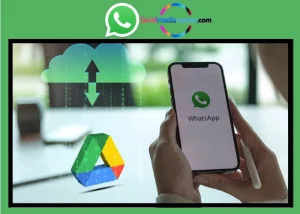
2. Cloud Backup Access (iCloud or Google Drive)
If the target user has chat backups enabled, and you have access to their Google or iCloud account, you can restore and view chats.
You’ll need to:
- Log into their account on a device you control.
- Install WhatsApp and verify their number.
- When prompted, restore the latest backup.
✅ Important: End-to-end encrypted backups (if enabled) require a separate encryption key. Without that, recovery is impossible — even for WhatsApp.
3. Parental Control Apps (Like AirDroid)
As a parent myself, I’ve tested AirDroid Parental Control with my teenager’s phone. It mirrors their screen in real time and captures app notifications — including WhatsApp.
You don’t need root access or technical skills.
Steps:
- Install AirDroid Parental Control on your phone.
- Install AirDroid Kids on your child’s phone.
- Pair the devices using a unique code.
- Now you can mirror the screen, monitor app activity, and receive WhatsApp notifications remotely.
👨👩👧 Ideal for: Parents monitoring minor children.
🔒 Respect your child’s privacy as they grow older.
4. WhatsApp Business API for Companies
If you’re running a business and using WhatsApp to chat with customers, your company can access messages through WhatsApp Business API integrations.
These are stored on your own systems (Twilio, 360dialog, etc.), and you can view them for support or audit purposes.
✅ Fully legal and secure.
🧠 Pro tip: This is a must for compliance in regulated industries.
🚫 What to Avoid
I can’t stress this enough: avoid shady apps, “spyware,” or any service that promises to hack WhatsApp.
Many of the tools marketed as “WhatsApp message readers” do one of the following:
- Require illegal access to someone’s device
- Use phishing or malware to steal data
- Get your own phone hacked in return
You might even face criminal charges depending on your country’s laws.
As someone who advises brands and families, I’ve seen firsthand how people get scammed or lose their own privacy chasing these shortcuts.
✅ TL;DR: Legal Ways to View Encrypted WhatsApp Messages
| Method | Requires Device Access | Works Remotely? | Legal & Ethical |
|---|---|---|---|
| WhatsApp Web | ✅ Yes | ✅ After setup | ✅ Yes |
| Cloud Backups | ✅ Yes (account access) | ✅ | ✅ Yes |
| AirDroid Parental App | ✅ Yes (initial setup) | ✅ | ✅ Yes (for kids) |
| Business API Logs | ❌ No (uses servers) | ✅ | ✅ Yes |
| Spyware/Cracking Tools | ❌ Illegal | ❌ | ❌ No |
Final Thoughts
Encrypted messaging is here to stay — and that’s a good thing for all of us. But that doesn’t mean you’re powerless when you need to protect your child, recover lost data, or manage business communications.
Stick to legal tools, act with consent, and stay informed. As the owner of SocialMediaNotes.com and a dad who’s been through the digital trenches, I can confidently say:
It’s better to be smart, secure, and ethical — than to be sneaky.
If you’re unsure which route is right for your situation, drop your question in the comments — I’m always happy to help.
🙋♂️ Frequently Asked Questions (FAQs)
Only if you have authorized access to their cloud backup (Google Drive or iCloud) and their WhatsApp account details. Otherwise, due to WhatsApp’s end-to-end encryption, reading messages without consent or access is not possible and not legal.
Yes, if your child is under 18, most jurisdictions allow parents or legal guardians to monitor their digital activity. However, it’s important to do this responsibly and with open communication as they grow older.
No — not in any legitimate or legal way. WhatsApp’s encryption is designed to prevent this. Any service claiming to “hack” WhatsApp is likely fraudulent, illegal, or harmful to your own device.
If you’ve enabled end-to-end encrypted backups and lost the 64-digit encryption key or password, you won’t be able to restore the backup. WhatsApp cannot recover it for you due to their zero-knowledge encryption policy.
iOS is more restricted than Android, but some parental control apps like AirDroid and Bark offer limited WhatsApp notification monitoring. Full message access is not available without iCloud backup access.
Technically, yes — but ethically and legally, no. Linking someone’s WhatsApp to your browser without their knowledge is a violation of privacy and could get you into legal trouble depending on where you live.
Yes. WhatsApp sends a push notification to the user’s device whenever a new session is linked via WhatsApp Web. So, it’s not exactly “secret.”


0 Comments